AMBIENT WASH
A shimmering reverb into drifting grains and a vast detuned space, for pads and evolving textures.
JSFXGFXRACK PRESET
Signal flow
As it opens in REAPER
FX: Ambient Wash
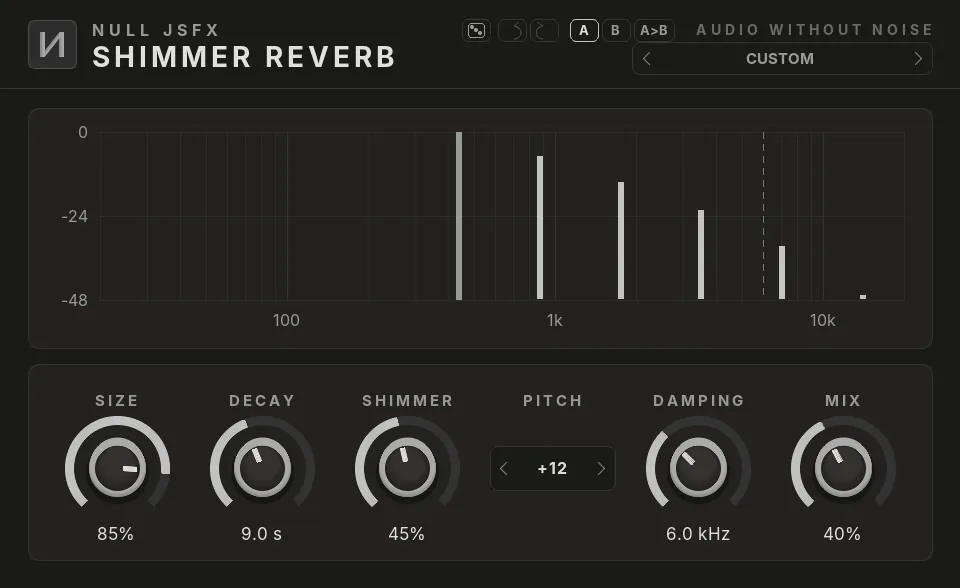
Click a plugin in the list to see it. The pictures are the real NULL JSFX GFX interfaces, drawn with this chain's settings; the window around them is drawn by this site, so REAPER's own frame looks a little different.
Listen BETA
Live: the whole chain runs in your browser on a loop of NULL JSFX instruments, every plugin with the chain's settings. Bypass it while it plays.
Beta: the chain is played by the web version of each plugin, the same code as orOS Studio, which matches the plugins within the suite's tests (1e-6). Playing several plugins at once in a browser is new, so tell us if it stutters.
The settings
What the chain changes from each plugin's defaults. Every control stays free to change after you load it.
1Shimmer Reverb
- Size85%
- Decay9 s
- Shimmer45%
- Mix40%
2Granular Delay
- Delay Time450 ms
- Grain Size160 ms
- Density30 grains/s
- Spray50%
- Reverse30%
- Feedback55%
- Stereo Spread90%
- Mix35%
3Space
- TypeGalaxy
- Size80%
- Decay75%
- Damping40%
- Mix35%
Load it
- Install NULL JSFX with the Hub or the JSFX download: the chains come in its
FXChainsfolder. - In REAPER, open a track's FX window and pick FX → Add FX chain, then NULL JSFX (REAPER's sliders) or NULL JSFX GFX (our interfaces), then Ambient Wash.
- In any other DAW: load the NULL JSFX Rack (VST3 or CLAP) and pick its preset Ambient Wash.
Download free
Part of NULL JSFX 4.1: 174 plugins and 89 FX chains, free and open source (MIT).