PODCAST READY
Noise reduction, hum removal, de-plosive, de-esser, leveling and a limiter, with a meter set to -16 LUFS; Amount cleans harder, Loudness raises the level.
Signal flow
As it opens in REAPER
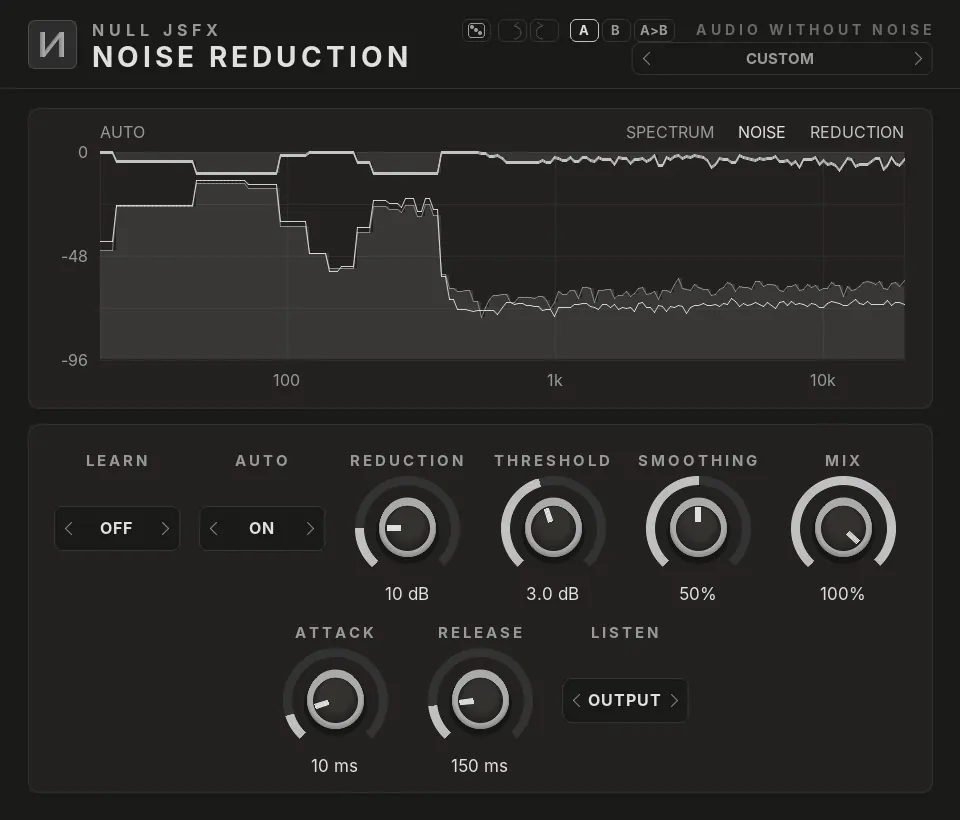
Click a plugin in the list to see it. The pictures are the real NULL JSFX GFX interfaces, drawn with this chain's settings; the window around them is drawn by this site, so REAPER's own frame looks a little different.
The settings
What the chain changes from each plugin's defaults. Every control stays free to change after you load it.
1Noise Reduction
- AutoOn
- Reduction10 dB
- Threshold3 dB
2De-Hum
- Frequency50 Hz
- Harmonics4
- Depth30 dB
- Low Cut40 Hz
3De-Plosive
- Sensitivity50%
- Max Reduction15 dB
4DeEsser
- Target6000 Hz
- Reduction−5 dB
5Auto-Leveler
- Target−17 dB
- Speed1000 ms
- Max Boost12 dB
- Max Cut9 dB
6Limiter
- ModeLimiter
- Threshold−2 dB
- Ceiling−1 dB
7Loudness Meter
- Target-16 LUFS
Modulation
- Macro 1 moves Noise Reduction · Reduction by +20%
- Macro 1 moves DeEsser · Reduction by -20%
- Macro 2 moves Auto-Leveler · Target by +15%
In REAPER an LFO is a parameter modulation and the envelope an audio control signal on the control it moves; a macro is the control with the largest depth, and the others follow it through parameter links. The Rack preset of the same name has them as real LFOs, envelope and macro knobs.
Load it
- Install NULL JSFX with the Hub or the JSFX download: the chains come in its
FXChainsfolder. - In REAPER, open a track's FX window and pick FX → Add FX chain, then NULL JSFX (REAPER's sliders) or NULL JSFX GFX (our interfaces), then Podcast Ready.
- In any other DAW: load the NULL JSFX Rack (VST3 or CLAP) and pick its preset Podcast Ready.